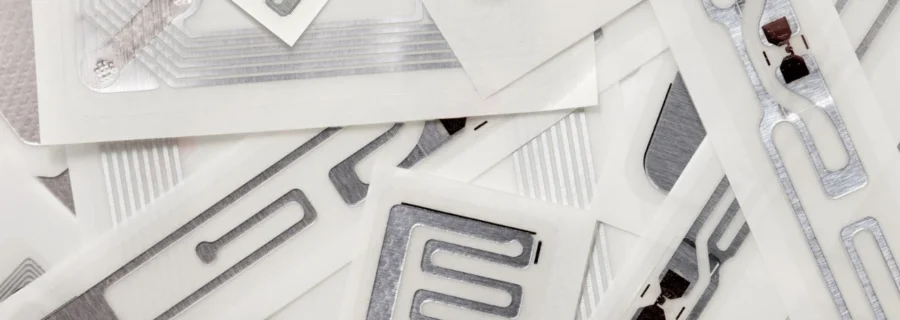
To answer what is an RFID tag, let’s start with the acronym. RFID (Radio-Frequency Identification) is the recognition of objects via radio: a reader sends a signal, and the tag on the object responds with its number. Unlike a barcode, the tag does not need to be visible to the reader and does not have to be held at a specific angle.
In practice, three things are needed: a tag, a reader with an antenna, and a piece of software that knows what to do with the number. We deal mostly with the third one, and the second half of this text is about it.
The first half walks through the types of RFID tags and their frequencies, then settles the RFID vs NFC question. The second half covers RFID reader integration in devices we designed. It ends with offline RFID access control; for the moment, the server stops responding.
Key takeaways
An RFID tag is a chip with an antenna that returns its number to a reader when the reader’s field reaches it.
Passive tags have no battery and are read from a few centimeters up to a few meters, while active tags with a battery reach 100 m and more.
In the RFID vs NFC comparison, NFC is a 13.56 MHz variant of HF RFID with a range of a few centimeters. It lets a phone act as a reader or a tag.
In RFID reader integration, reading the number is the easy part. Most design decisions concern what the device does with it.
Offline RFID access control needs a conscious decision about what the device does without a server, made before the first line of firmware.
What is an RFID tag, and what are the types
Every tag holds a tiny chip connected to an antenna. The packaging differs because a tag can be a card, key fob, sticker, ear tag, or a glass capsule. The chip knows at least its number (UID), and often also has some memory where data can be saved.
The most important classification of the types of RFID tags is based on how the tag is powered:
| Type | Power | Range (approximate) | Typical applications |
|---|---|---|---|
|
Passive |
No battery. The tag is powered by the reader’s field |
From a few cm (LF, HF) to a few meters (UHF), in exceptional conditions up to 15 m |
Access cards, stickers on goods, animal chips |
|
Passive with battery (BAP, semi-passive) |
A battery powers the circuit, but the tag doesn’t transmit on its own; it only reflects the reader’s signal |
Further than passive |
Sensors with temperature logging in the cold chain |
|
Active |
Battery. The tag transmits the signal itself |
100 m and more |
Tracking containers, vehicles, equipment |
The ranges in the table follow GS1 figures for typical RFID tag read range. You will most often encounter passive tags: they are cheap, thin, and work for years because they have nothing to discharge.
How LF, HF, NFC, and UHF frequencies differ
The second issue is the choice among RFID frequency bands. The band determines the range, reading speed, and whether the tag will work near water or metal at all. That is why we choose it at the very beginning, before anyone draws the PCB.
| Band | Frequency | Passive range (typical) | Key standards | Where it works well |
|---|---|---|---|---|
|
LF |
125 kHz, 134.2 kHz |
from a few cm to approx. 1 m |
ISO 11784/11785 (animals), ISO 14223 |
animal identification, simple access cards, environments with water |
|
HF |
13.56 MHz |
from a few cm (access cards, payments) to approx. 1 m |
ISO/IEC 14443, ISO/IEC 15693 |
payment and access cards, tickets, libraries |
|
NFC |
13.56 MHz |
a few cm |
NFC Forum, based on ISO/IEC 14443 |
phones, device pairing, product labels |
|
UHF |
860–960 MHz (EU: 865–868 MHz, USA: 902–928 MHz) |
usually a few meters, exceptionally up to 15 m |
EPC Gen2 / ISO/IEC 18000-63 |
warehouses, retail, clothing, logistics |
|
Microwaves |
2.45 GHz |
tags usually active |
ISO/IEC 18000-4 |
location systems |
Ranges according to GS1.
NFC is practically a segment of HF RFID with a very short range, designed so that a phone can act as both a reader and a tag.
UHF RFID in short
UHF RFID (or RAIN RFID, as the industry calls it) is used when you need to count many things at once and from a distance. Thanks to the anti-collision mechanism from the EPC Gen2 air interface standard, the reader can read many tags per second: even a small UHF module designed to be built into a device is specified for up to 300 tags per second.
That’s a value under good conditions; in the field, it’s lower. However, it’s still enough for a pallet of cartons or a rack of clothes to pass through a gate without taking anything out.
The price for the range is sensitivity to the environment. Water absorbs energy in the UHF band, and metal reflects it and detunes the tag’s antenna. For metal objects, special on-metal RFID tags with a spacer layer are used, and for products with high water content, the reading must be tested in target conditions, not on a desk.
RFID vs NFC, barcode, and BLE
| Technology | Visibility needed? | Reading many at once | Range | Label cost |
|---|---|---|---|---|
|
Barcode / QR |
yes |
no |
depends on the scanner |
practically zero |
|
Passive RFID (UHF) |
no |
yes |
up to a few meters |
approx. $0.05–0.25 |
|
NFC |
no |
no (one tag near the phone) |
a few cm |
approx. $0.10–0.50 |
|
BLE beacon |
no |
yes |
tens of meters |
average approx. $25, requires battery |
Estimated prices for large quantities: UHF and NFC tags according to the tag price guide, BLE beacon according to the manufacturer.
A barcode is sufficient when a person has to pick up the object anyway. RFID makes sense when the reading is supposed to happen on its own, for example, when an animal approaches a station, or someone puts an item back on a shelf.
BLE beacons cost more and need a battery, but they cover tens of meters. We describe where Bluetooth fits in our guide to BLE usage in IoT.
What an RFID system looks like in an IoT device
Reading the number in the device itself is the simplest part. Then, roughly this happens:
The reader detects the tag and passes its number to a microcontroller or single-board computer.
The device checks the number in a local database or asks a server.
A decision is made: open the lock, start the engine, dispense a dose, deny.
The event goes to a log, and the log goes to the cloud when there is a connection.
The reader connects to the rest of the device via one of the typical interfaces: SPI, I2C, UART/RS232, RS485, Wiegand, or USB. The popular NXP MFRC522 reader IC (13.56 MHz) has SPI, I2C, and UART in one chip, so you choose the interface for the board, not for the reader.
What RFID projects have taught us
Below are a few decisions from our projects, mainly PCB and architecture designs we prepared for clients. We do not disclose client names or order details.
Custom RFID reader board vs. ready-made module
Take a workstation where a driver opens a gate with a card. The client wanted a ready-made UART/RS232 reader there, along with a numeric keypad. We proposed a small custom RFID reader board based on the RC522 chip with an antenna etched on the PCB, connected to the mainboard via I2C using a wire or goldpins. The antenna is built into the reader board, not the mainboard.
In an automatic animal feeding station, it was the opposite: from the beginning, the client indicated a ready-made, panel-mounted reader designed for animal identification. We were to connect it to a single-board computer and write everything that happens after reading. In our proposal, we explicitly listed the risk that appears most often with ready-made modules: the compatibility of the reader with the controller and the system on the single-board computer.
A third example is a PCB project for a battery-powered device with motors that reads tags in elements placed beneath it. It is controlled by an nRF52832, and this microcontroller has NFC pins. It’s tempting to use them, but the NFC peripheral in the nRF52 can only act as a tag that a phone reads. It cannot read someone else’s card.
Therefore, in the project, the NFC pins were left unconnected; the 13.56 MHz reader is a separate chip on SPI, and the antennas connect to a flexible printed circuit (FPC).
Which cards to choose for access control
Where a card opens a physical element, we recommended NTAG216 (ISO/IEC 14443) cards as, quoting our proposal, “a reasonable compromise between price, security, capabilities, and programming ease.” The NXP NTAG216 datasheet lists 888 bytes of user memory and password write protection.
If the system only checks the card’s UID number, the card can be cloned on cheap cards with a writable UID. For access to machines or rooms of higher importance, it is better to choose cards with cryptography (e.g., MIFARE DESFire with AES) and authenticate the card, not just its number.
Offline RFID access control when the server doesn't respond
This decision is easy to overlook because the network always works on the test bench. If you are designing a device with a reader, ask the client this question before the first line of firmware is written. In two projects, we got two different answers.
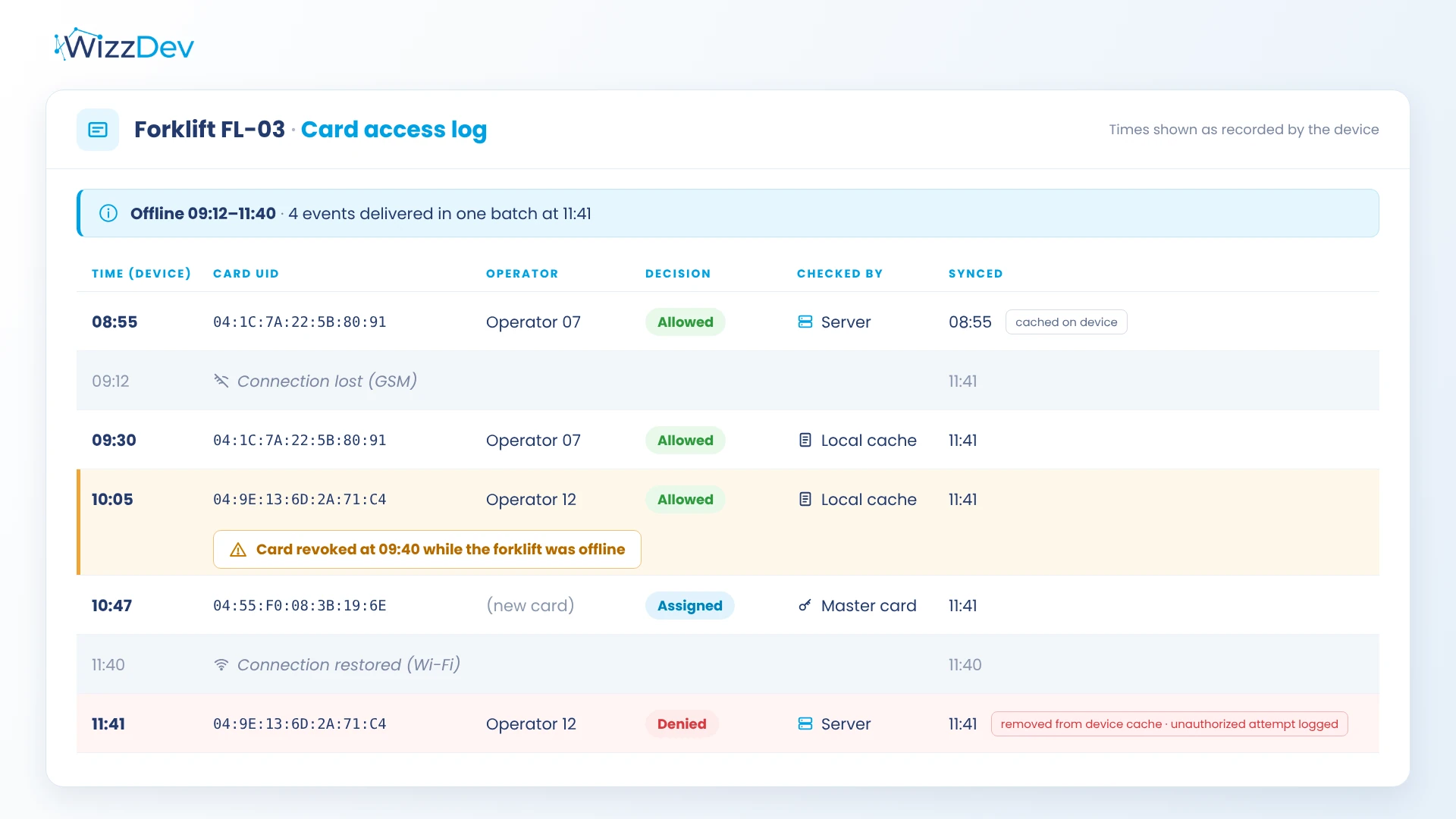
The first answer was a local list of trusted cards. In an ignition switch for forklifts (card or NFC in a phone or tablet assigned to the operator), the assumption was: lack of connection cannot prevent the use of the forklift. The solution:
with each successful online startup, the forklift remembers the card ID locally,
without connectivity, it checks the card against this local list and saves the event for later transmission,
when the server responds that the card is invalid or unassigned from the forklift, the forklift removes it from memory, and the system registers an attempted unauthorized access,
a new card can be assigned offline with a master card,
backlogged events fly to the server along with the current one, once a day or after GSM/Wi-Fi is recovered.
This variant has a weak point: a revoked card works offline until the forklift connects to the server. If this is unacceptable, you have to actively push the list of revoked cards to the devices, rather than waiting for the next attempt to use it.
The second answer was to open without checking (fail-open). For the workstation with the gate, the requirements described a simpler emergency scenario: when there is no connection to the database or the backend isn’t responding, the driver’s code is read from the card and the gate opens immediately.
This choice prioritizes work continuity over control at a given moment: without a network, nobody checks permissions, so the only control is the logs reviewed after the fact. Therefore, local event logging is mandatory in this variant.
The third option, blocking when there is no connection (fail-closed), fits only where it’s better not to let anyone in than to let the wrong person in. It is important to choose this consciously, rather than getting it as a byproduct of code that simply waits for an HTTP response.
What to watch out for when designing
The range from the datasheet will not survive screwing the reader to a steel frame. Metal and water near the antenna detune it and shorten the range, so reading must be tested in the target enclosure and at the installation site.
Reads can be truncated, and the same tag can report several times in a row. Among the risks for the feeding station, we listed erroneous and incomplete reads, because the software must filter them out before starting the feeder motor.
What if two animals stand at the station? This question made it to the list for the client and remained unanswered in the documents. The entire logic of dispensing feed depends on the answer.
A reader that constantly polls the field eats the battery. The feeding station was supposed to work with a solar panel, so low power consumption was in the requirements from the start. In such devices, the reader should wake up upon an event, e.g., a signal from a presence sensor.
A docking station for rental vehicles has to operate from -35 to +70 °C and pass CE marking. The reader and antenna must withstand this along with the rest of the electronics, not just at room temperature.
Finally, the reverse case: the tag can be inside our device. In a pet tracker, we planned a dynamic NFC tag (ST25DV04KC) connected to the microcontroller via I2C. The device saves the owner’s contact details on it, and any phone can read them without installing an application. Our low-power NFC temperature logger uses an ST25 dynamic tag on I2C in the same way, so a phone can read the logged data.
How to choose an RFID tag - checklist
How many objects need to be read at once and from what distance? One from up close: HF/NFC. Many from afar: UHF.
What will the tag be stuck to? Metal and water require special tags or LF.
Is the number enough, or is data and protection against cloning needed?
Is a phone supposed to do the reading? If so, NFC (13.56 MHz).
Is there an industry standard? Animals: ISO 11784/11785. Retail and logistics: EPC Gen2.
What should happen when there is no network?
What are the operating conditions: temperature, moisture, vibrations, enclosure?
FAQ
Does an RFID tag need a battery?
A passive tag does not. It is powered by energy from the reader’s field. Only active and semi-passive (BAP) tags have a battery.
From what distance can an RFID tag be read?
From a few centimeters (NFC, HF cards) to a few meters (passive UHF, exceptionally up to 15 m). Active tags with a battery reach 100 m and beyond. The actual passive RFID tag read range depends on the antenna, reader power, and surroundings.
Can an RFID tag be tracked like GPS?
No. A passive tag only responds when it is within the reader’s range. You know which reader it was near, not where it is right now.
What is the difference between RFID and NFC?
NFC is a variant of HF RFID (13.56 MHz) with a range of a few centimeters, where a phone can act as a reader or a tag.