Reproducible embedded development with Docker addresses a problem that’s easy to dismiss until it costs you a full day of debugging. Developer A is working on a project, adding new features; everything is going smoothly, and then they push the changes to the repository. Developer B fetches the same commit, runs the same command and gets an error. The code is the same, but the environments differ. The ‘it works on my machine’ phenomenon, well-known in software development, can be particularly frustrating in embedded systems.
An embedded project rarely depends solely on the source code and the compiler. It also requires specific versions of CMake, Python, pip packages, SDKs, system libraries, additional repositories or the entire toolchain. Added to this are environment variables and tools for flashing and debugging the device.
Similar computers can therefore produce different results. Increasingly, simply storing the code in Git is not enough. It is also worth defining the environment for building it.
Where do the differences between builds come from?
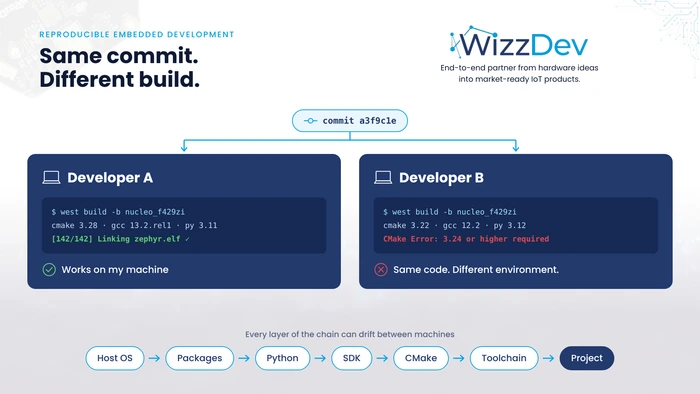
In a simple project, the environment may consist of just a few hardware and software tools for IoT developers. In embedded software development, however, dependencies quickly form a longer chain across a larger project:
Host OS → packages → Python → SDK → CMake → toolchain → project
					Install Ubuntu
Install Python
Install CMake
Install GCC
Install west
Install SDK
Install required packages
Each layer is subject to change. One developer may be using a different version of CMake, whilst another may have installed a system package several months ago and forgotten that the project requires it. pip may download a newer library, the SDK may be updated, and a Git dependency may point to a branch rather than a specific commit.
Some of the team may use Linux, whilst others use Windows and WSL. Even if the tools are available on both host systems, their installation and configuration may differ.
These differences may only come to light after a few months, when a new developer joins or someone revisits older code. A README from six months ago may no longer accurately reflect the environment as it was at that time.
The README describes the environment, but does not replicate it
The configuration guide might look like this:
A comprehensive README is better than no documentation at all, but it remains a guide for humans. It doesn’t guarantee that the same versions of tools will be used on two computers, and it won’t update itself after every change. Reproducible builds are processes that ensure identical binary outputs are generated from the same source code and build environment, regardless of the workstation or timing. This requires a version-controlled, immutable environment definition that eliminates the ‘works on my machine’ variable.
Over time, working environments accumulate additional steps that nobody has documented. The person whose build works remembers the fix; everyone else hits the same wall. Docker allows you to define the environment in code, alongside the rest of the project, so that definition can be versioned, reviewed and shared like any other file.
Docker as a project build environment
In embedded systems, Docker can be used to define the environment for building a project. This does not require running containers on the target device.
A Dockerfile can specify the base Linux distribution, system packages, Python and CMake. It can also specify the compiler, cross-compiler, SDK, build tools and additional utilities required for the project. A cross-compiler is a tool that generates executable code for a target platform (like a microcontroller) different from the host system where the build runs. When part of a containerized embedded toolchain, it ensures that every developer uses the exact same compiler version, preventing binary discrepancies caused by local environment differences.
A reproducible example of a project structure might look like this:
					project/
├── .devcontainer/
│   └── devcontainer.json
├── Dockerfile
├── requirements.txt
├── CMakeLists.txt
├── west.yml
└── src/
Instead of installing the toolchain on a developer’s computer, you can build an image containing the required environment. Several people can use the same Dockerfile. The computer handles much of the configuration, so a new developer doesn’t need to manually reproduce the sequence of commands from memory or a README.
However, simply adding Docker does not solve the problem of reproducibility.
Docker, too, may cease to be reproducible
A Dockerfile that works today may build a different environment in a few months’ time. A simple example is:
FROM ubuntu:latest
The ‘latest’ tag does not indicate an immutable image. In future, we may download a different image. The same applies to dependencies:
pip install some-package
Without specifying a version, a future build may download a newer package. This also applies to Git:
git clone https://example.com/project.git
The contents of the current branch may change without any action on our part.
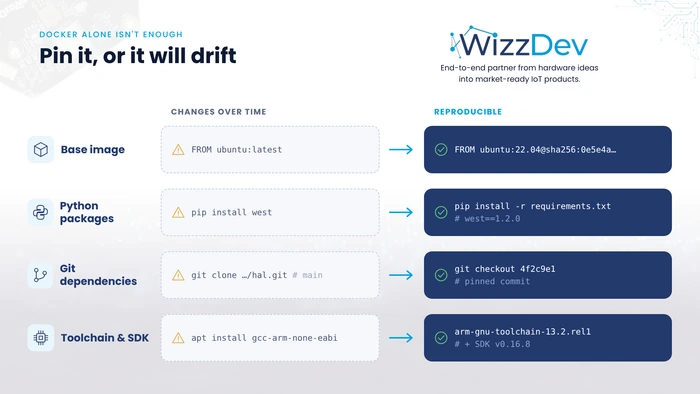
That is why it is necessary to pin important elements of the environment. Depending on the project, these will include versions of the base image, the SDK, the toolchain and Python dependencies. Added to this are specific Git tags or commits, modules downloaded via West, and essential system packages.
For example, in a Zephyr-based project, you can specify the SDK version, module revisions and a set of Python dependencies. There is no need to assign versions to absolutely everything at all costs. The aim is to limit the elements that may change beyond the project’s control.
Docker helps to isolate the environment from the host, but recreating it also requires proper dependency management.
Dev Containers in day-to-day work
Docker works well as a build environment, but manually starting a container to work on a project isn’t always convenient. Dev Containers (Development Containers) are standardized environments defined in code that allow developers to run an IDE and toolchain inside a Docker container. They ensure a consistent embedded development environment across different host operating systems by containerizing the entire workspace.
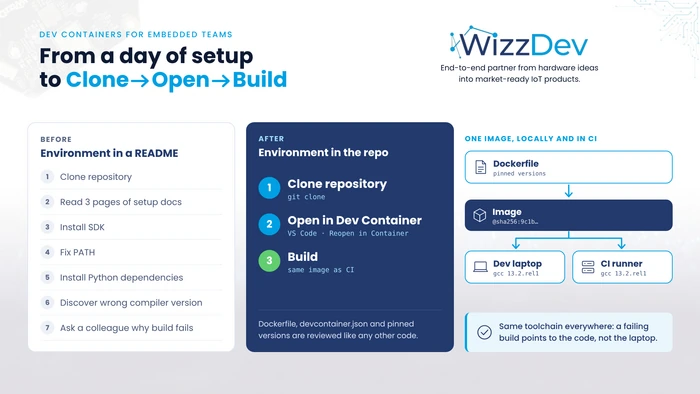
The terminal, compiler, CMake and other tools run within the container, whilst the developer uses their IDE as normal. The workflow might look like this:
In a larger project, you still need to manage SDKs, credentials, USB devices and various build variants. Configuration isn’t always as simple as three clicks.
Much of the configuration ends up in the repository rather than remaining in the README, terminal history and the memory of the person whose build works. This matters particularly for embedded reproduction in platform data work – when build outputs, SDK versions and toolchain configurations need to be consistent across machines and over time, having that definition live in the repository is what makes it enforceable. Dev Container can also specify IDE extensions and workspace configuration, which reduces differences between workstations.
Embedded makes things more complicated
In a standard application, it is sometimes possible to encapsulate almost the entire workflow within a container. In embedded systems, however, you also need to communicate with the physical device. The build process itself is usually the simplest part; the difficulties arise when it comes to flashing, debugging and communicating with the hardware.
Deterministic firmware builds are build processes where the same input source code produces bit-for-bit identical binary images every time. This is critical for safety-certified systems and security audits where the integrity of the binary must be verified against the audited source.
USB and debug probes
Debug probes are one of the more friction-prone boundaries in any embedded development environment. J-Link, ST-Link, USB DFU, or devices visible as /dev/ttyUSB* must be accessible from within the container, which means configuring access to the host’s devices explicitly.
On Linux, this typically requires setting udev rules, permissions, and user groups. On other hosts, device sharing may work differently – and in some cases, it won’t work transparently at all. This is a layer of configuration that doesn’t resolve itself automatically, and it’s worth accounting for it early when deciding how much of the workflow to move into the container.
Serial ports
When using Docker for embedded development, serial port access is one of the practical boundaries you’ll need to plan for. If your application communicates via UART, the container needs explicit access to the host’s serial port – device mapping and appropriate permissions must be configured rather than assumed. An additional complication is that device names can vary between workstations, so what appears as /dev/ttyUSB0 on one machine may differ on another, which means you can’t always rely on a fixed path in your configuration.
Bluetooth
Bluetooth Low Energy (BLE) cannot always be treated as a simple library within the image. The container may require the host’s Bluetooth interface or stack. This represents another boundary between the isolated environment and the hardware.
Windows and WSL
On Windows, there may be an additional layer:
Windows → WSL → Docker/container → hardware
The build may run without any issues, and the greatest challenge will be making USB available to the environment containing the flashing tools.
A reproducible embedded build can be transferred to a container relatively easily. Recreating the entire workflow, including debug probes, serial ports, Bluetooth and physical devices, requires more work. It is not always worth transferring everything there.
The same environment locally and in CI
The developer may have all the dependencies, whilst the CI runner may be running a different version of the system or toolchain:
Developer environment ≠ CI environment
The build works locally, but the pipeline fails. A Docker image can serve as both a local environment and the basis for CI processes. This is particularly relevant for embedded build systems, where the toolchain, SDK and cross-compiler versions all need to match precisely – a mismatch between local and CI environments is often the root cause of failures that are difficult to reproduce and slow to diagnose. The entire pipeline doesn’t need to have an identical configuration, but the core tools and dependencies can come from the same source.
Such an environment is also useful for unit testing, static analysis, formatting, packaging artefacts and other automated integration testing in embedded systems prior to integrating changes. Fewer differences between the local build and CI mean less time spent troubleshooting environment-related issues.
Common pitfalls
Containers solve some problems, but they can also create new ones. The most common mistake is leaving dependencies unpinned – using ‘latest’ tags, unversioned pip installs, or a Git branch instead of a specific commit. The result is an image that silently drifts over time, undermining the reproducible builds embedded systems teams depend on.
Beyond consistency, reproducibility is a critical security control; it provides a strong countermeasure against attacks where binaries do not match their source code, ensuring that no malicious code was inserted during the build process.
Another problem is hidden dependencies on the host. If the build relies on a tool or file outside the container, you lose the isolation that makes the environment trustworthy in the first place.
It’s also easy to build a bloated image containing everything that might come in handy one day. This is convenient initially, but builds slow down and it becomes harder to determine which components are actually required. Poor layer ordering compounds this: a small change can invalidate the cache and trigger a full reinstallation of the SDK and all dependencies, which makes working with the container genuinely frustrating.
A tool that’s heavily dependent on hardware access is sometimes better left on the host. Not every part of the workflow needs to move into the container. The more useful question is which components actually introduce variability – those are the ones worth isolating. Identifying that boundary, rather than containerizing everything by default, is what keeps the environment maintainable and the reproducible builds your embedded systems rely on actually reproducible.
When do Docker and Dev Containers make the most sense?
When there are a large number of dependencies, this approach usually yields the greatest benefits. If several people are using a large SDK, cross-compilation and additional build tools, the cost of manually maintaining the environment rises rapidly.
The same applies to products maintained over the long term. In two or three years’ time, being able to recreate the environment may be more important than how easily it can be installed today. Dev Containers can also make onboarding much easier, as a new team member receives a repository containing much of the configuration rather than a long list of installations.
With a simple Makefile, a single standard toolchain and a few source files, Docker may add more configuration than it brings benefits. The choice depends on the cost of the problem we are trying to solve.
How should this look from a developer’s perspective?
Without a defined environment, the onboarding process might look like this:
					Clone repository
Read 3 pages of setup instructions
Install SDK
Fix PATH
Install Python dependencies
Discover wrong compiler version
Ask another developer why build fails
Every step can cause the working environments of two people to diverge. With a containerized embedded toolchain, the target workflow becomes much simpler:
					Clone repository
Open Dev Container
Build
When working with hardware, it isn’t always possible to fully achieve this workflow. The more configurations in the repository that can be reproduced automatically, the less the team relies on a specific laptop or the expertise of a single developer.
Reproducible embedded development with docker - example
Consider a team working on embedded software development for an STM32 microcontroller. The project requires a specific version of the ARM GNU Toolchain, a specific STM32CubeIDE SDK release, Python 3.11 with a handful of pinned packages for code generation, and OpenOCD for flashing. On a fresh laptop, getting all of this aligned correctly can take the better part of a day.
Six months later, a new team member attempts the same setup and finds that the toolchain download URL has changed, one Python package has released a breaking update, and nobody remembers which OpenOCD patch version was originally used.
With a Dockerfile that pins the toolchain to arm-gnu-toolchain-13.2.rel1, installs the Python packages from a committed requirements.txt, and locks the OpenOCD build to a specific Git tag, the environment becomes a description rather than a memory.
The Dev Container configuration mounts the project directory, forwards the USB device for the debugger, and sets the default build task. A new team member clones the repository, opens it in VS Code, and the environment builds itself. The compiler version in CI matches the one on every developer’s machine because both pull from the same image, tagged with a digest rather than a floating label.
This is the pattern reproducible embedded software development with Docker is built around: the Dockerfile lives next to the source code, changes to the environment go through the same review process as changes to the firmware, and the question of which toolchain version produced a given binary has a clear, traceable answer. The hardware still needs to be physically present, but everything up to the point of flashing is deterministic.
Summary
The build environment is part of the project. We’ve long version-controlled source code in Git – the Dockerfile, Dev Container configuration, dependency versions, SDK, and toolchain definitions deserve the same treatment.
Docker alone doesn’t guarantee reproducibility. Unspecified versions and hidden host dependencies carry part of the problem into the container. But a well-defined, pinned environment is a much stronger foundation than a README that drifts out of date.
This approach also extends naturally to the embedded CI/CD pipeline. When the same Docker image drives both local builds and CI, the gap between “works on my machine” and “fails in the pipeline” narrows considerably. Fewer environment mismatches mean less time diagnosing failures that have nothing to do with the code itself.
If the environment lives only in documentation and on developers’ laptops, it will diverge over time. When its critical elements are defined in code, they can be versioned, reviewed, and reproduced alongside the project – by every developer, on every machine, and in every pipeline run.
Key Takeaways
The same commit doesn’t guarantee the same build if developers’ environments differ – a consistent embedded Docker development environment is what closes that gap.
Docker lets you define a large part of the build environment alongside the project, versioned and reviewable like any other file.
Docker alone doesn’t ensure reproducibility. You also need to pin base images, SDK versions, toolchain releases and Python dependencies.
Dev Containers make day-to-day work in a containerised environment more practical, reducing configuration differences between workstations.
In embedded systems, access to physical hardware – debug probes, serial ports, Bluetooth – remains the biggest challenge that containers don’t resolve automatically.
Sharing the same Docker image locally and in CI minimises environment mismatches and reduces time spent diagnosing failures that can’t be reproduced elsewhere.